

A cluttered desk can lead to a cluttered mind. Studies show that an organized workspace boosts productivity, reduces stress, and even enhances creativity. If you spend hours at your desk, whether for work, gaming, or studying, keeping it tidy is essential. One of the easiest ways to declutter is by using a headset holder.
I used to toss my headset on my desk after every call or gaming session. It wasn’t long before my workspace looked like a battlefield of tangled cords and scattered gear. Once I invested in a headset holder setup, my desk transformed. My headset was always within reach, my cables stayed tangle-free, and my mind felt clearer. This guide will show you how to organize your desk with a headset holder for maximum efficiency and style.
Why a Headset Holder Is a Game-Changer for Your Desk
A headset holder might seem like a small addition, but it can make a big difference in your workspace organization. According to a study by Princeton University, a cluttered environment can limit your ability to focus and process information. By keeping your headset off your desk and in a designated spot, you free up valuable space and reduce visual distractions.
Additionally, a headset holder protects your investment. Headsets, especially high-quality ones, can be expensive. Leaving them lying around increases the risk of damage from accidental drops, spills, or tangled cords. A holder keeps your headset safe, secure, and ready to use whenever you need it.
A headset holder also improves accessibility. Instead of digging through a pile of papers or untangling cords every time you need your headset, you can simply grab it from its holder. This saves time and reduces frustration, allowing you to focus on what matters most.
Types of Headset Holders to Consider
Desk-Mounted Holders
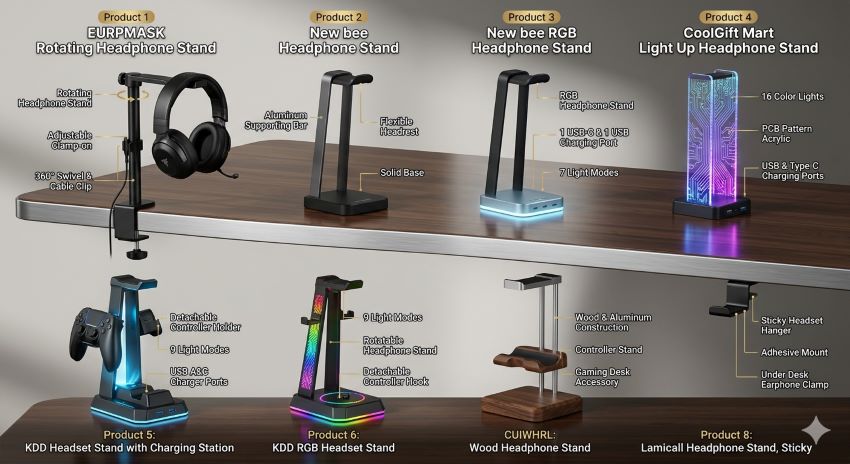
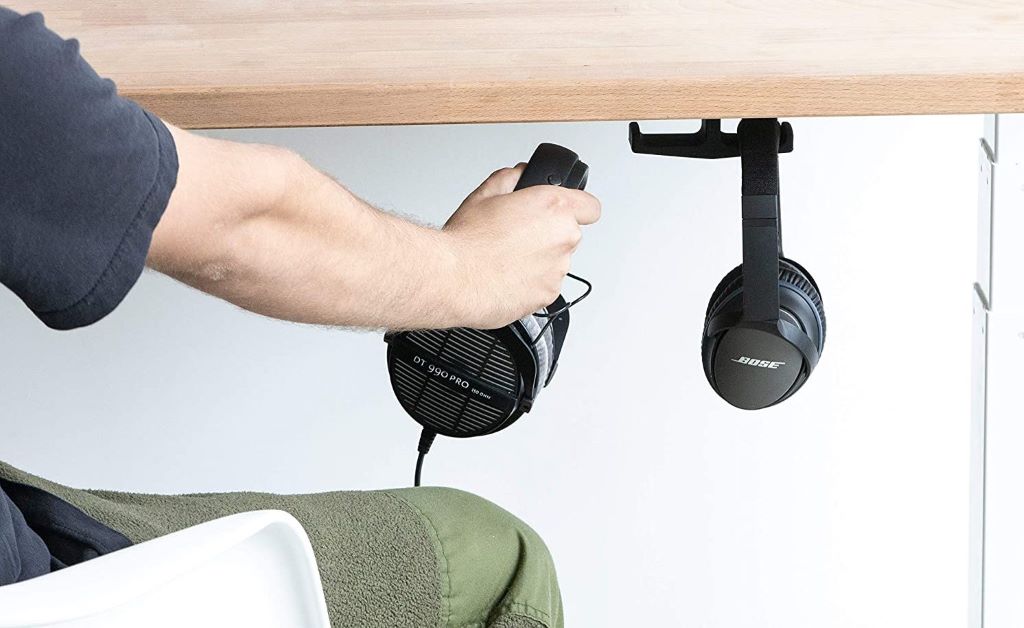
Desk-mounted holders are a popular choice because they’re easy to install and keep your headset within arm’s reach. These holders typically clamp or screw onto the edge of your desk, providing a sturdy and convenient place to hang your headset. They come in various materials, including plastic, metal, and wood, so you can choose one that matches your desk’s aesthetic.
One of the biggest advantages of desk-mounted holders is their versatility. They can be positioned on either side of your desk, depending on your preference and workspace layout. Additionally, many desk-mounted holders feature built-in cable management systems, which help keep your cords neat and tangle-free.
However, desk-mounted holders may not be suitable for all desks. If your desk is particularly thick or has an unusual shape, you may need to look for a holder with adjustable clamps or a universal mounting system.
Wall-Mounted Holders
Wall-mounted holders are a great option if you want to keep your headset off your desk entirely. These holders attach to the wall behind or beside your desk, freeing up even more workspace. They’re ideal for small desks or minimalist setups where every inch of space counts.
Wall-mounted holders come in a variety of styles, from simple hooks to sleek, modern designs. Some even include additional storage for other accessories, like cables, chargers, or gaming controllers. This makes them a versatile and functional addition to any workspace.
The main downside of wall-mounted holders is that they require a bit more effort to install. You’ll need to drill holes into your wall, which may not be ideal if you’re renting or don’t want to damage your walls. However, many wall-mounted holders come with adhesive strips, which provide a damage-free alternative to screws.
Freestanding Holders
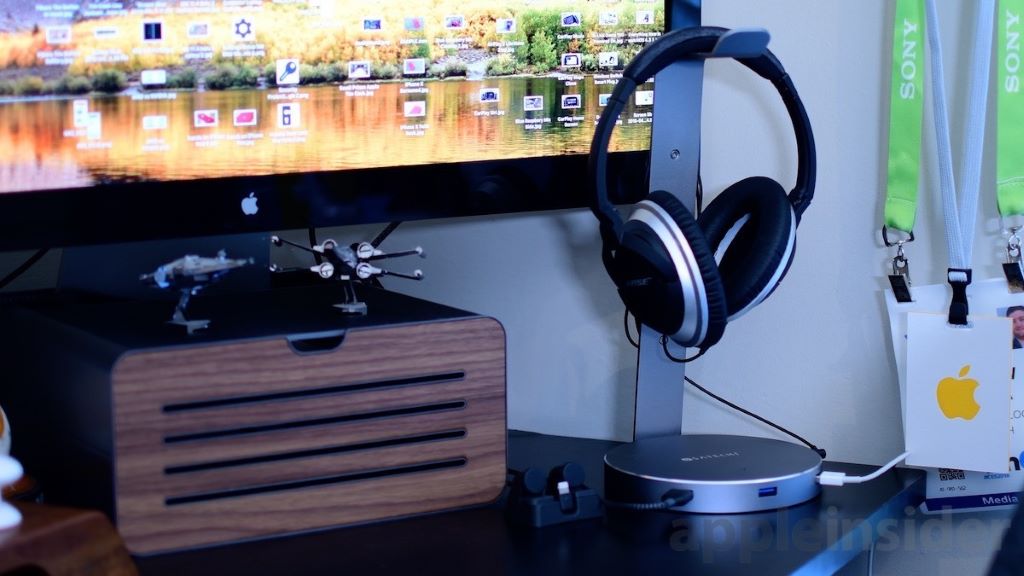
Freestanding holders are a great option if you don’t want to mount anything to your desk or wall. These holders sit on your desk or another flat surface, providing a dedicated spot for your headset. They come in a variety of designs, from simple stands to more elaborate structures with multiple storage options.
One of the biggest advantages of freestanding holders is their portability. You can easily move them from one desk to another, making them ideal for shared workspaces or home offices. Additionally, many freestanding holders feature a weighted base, which ensures stability and prevents tipping.
However, freestanding holders can take up more desk space than mounted options. If you have a small desk, you may need to choose a compact design to avoid clutter.
How to Choose the Right Headset Holder for Your Needs
Consider Your Desk Space
The first step in choosing a headset holder is to assess your desk space. If you have a large desk with plenty of room, a freestanding holder might be the best choice. It can sit on your desk without taking up too much space and provide easy access to your headset.
If your desk is smaller or already cluttered, a desk-mounted or wall-mounted holder may be a better option. These holders keep your headset off your desk, freeing up valuable space for other essentials. Additionally, they can be positioned in a way that keeps your headset within easy reach.
Think About Your Headset
The type of headset you own can also influence your choice of holder. If you have a large, over-ear headset, look for a holder with a wide or deep cradle to accommodate its size. For smaller, on-ear or in-ear headsets, a simple hook or clip may be sufficient.
Additionally, consider the weight of your headset. Heavier headsets may require a sturdier holder, such as one made from metal or wood. Lighter headsets can be hung from a plastic or adhesive hook without any issues.
Match Your Aesthetic
Your headset holder doesn’t just have to be functional—it can also be a stylish addition to your workspace. Choose a holder that matches your desk’s color scheme or overall aesthetic. For example, if you have a modern, minimalist desk, a sleek metal or wood holder might be the perfect fit. If your workspace has a more playful vibe, a colorful or uniquely shaped holder can add a touch of personality.
Additionally, consider the material of the holder. Metal and wood holders are durable and long-lasting, while plastic holders are lightweight and often more affordable. Choose a material that fits your needs and preferences.
Step-by-Step Guide to Setting Up Your Headset Holder
Step 1: Choose the Location
The first step in setting up your headset holder is to choose the right location. If you’re using a desk-mounted holder, decide whether you want it on the left or right side of your desk. Consider which hand you use to grab your headset and where you have the most space.
For wall-mounted holders, choose a spot that’s within easy reach of your desk. Make sure the wall is sturdy enough to support the holder and your headset. If you’re using adhesive strips, ensure the surface is clean and dry for the best adhesion.
For freestanding holders, find a flat, stable surface on your desk. Make sure the holder is close enough to your workspace that you can easily grab your headset when needed.
Step 2: Install the Holder
If you’re using a desk-mounted holder, follow the manufacturer’s instructions to attach it to your desk. Most desk-mounted holders come with a clamp or screw that secures the holder to the edge of your desk. Make sure the clamp is tight enough to hold your headset securely but not so tight that it damages your desk.
For wall-mounted holders, use the included hardware to attach the holder to the wall. If you’re using adhesive strips, press the holder firmly against the wall and hold it in place for the recommended amount of time. Avoid moving or adjusting the holder for at least 24 hours to ensure a strong bond.
For freestanding holders, simply place the holder on your desk or another flat surface. If the holder has a weighted base, make sure it’s stable and won’t tip over when you place your headset on it.
Step 3: Organize Your Cables
Once your holder is installed, take the time to organize your headset’s cables. Many headset holders come with built-in cable management systems, such as clips or hooks, to keep your cords neat and tangle-free. If your holder doesn’t have these features, you can use cable ties or Velcro straps to secure your cables.
Start by unplugging your headset from your device and straightening out the cable. Then, use the cable management system to secure the cable to the holder or your desk. This will prevent tangles and make it easier to grab your headset when you need it.
Step 4: Test the Setup
After installing your holder and organizing your cables, test the setup to make sure everything works as expected. Place your headset on the holder and make sure it’s secure and stable. Then, grab your headset and plug it in to ensure the cable is long enough and free from tangles.
If everything looks and feels good, you’re ready to start enjoying your newly organized workspace. If not, make any necessary adjustments to the holder or cable management system.
Creative Ways to Use a Headset Holder
Multi-Functional Storage
A headset holder doesn’t just have to hold your headset. Many holders come with additional storage options, such as hooks, shelves, or compartments, that can be used to store other accessories. For example, you can use the hooks to hang your gaming controller, mouse, or other small items. The shelves or compartments can hold chargers, cables, or even small plants.
This multi-functional approach helps you maximize your desk space and keep everything organized in one place. It’s a great way to declutter your workspace and make it more functional.
Decorative Display
If you have a stylish or unique headset, why not show it off? A headset holder can double as a decorative display, allowing you to showcase your headset when it’s not in use. Choose a holder that complements your headset’s design and color scheme, and position it in a way that highlights your headset’s best features.
This is especially great for gamers or audio enthusiasts who take pride in their gear. A well-placed headset holder can add a touch of personality to your workspace and make it feel more like your own.
Travel-Friendly Setup
If you’re always on the go, a portable headset holder can be a lifesaver. Look for a freestanding holder that’s lightweight and easy to pack in a bag or suitcase. This allows you to keep your headset organized and protected, even when you’re away from your desk.
Additionally, consider a holder with a built-in cable management system to keep your cords tangle-free during travel. This will save you time and frustration when you’re setting up your workspace in a new location.
Common Mistakes to Avoid When Using a Headset Holder
One of the biggest mistakes is choosing a holder that’s not compatible with your headset. Make sure the holder is large enough and sturdy enough to support your headset’s size and weight. Additionally, consider the type of headset you have—over-ear, on-ear, or in-ear—and choose a holder that’s designed to accommodate it.
Another common mistake is installing the holder in an inconvenient location. Your headset holder should be within easy reach of your workspace, so you can grab your headset quickly and easily. Avoid placing the holder too far away or in a spot that’s difficult to access.
Lastly, don’t forget to organize your cables. A headset holder won’t do much good if your cables are still tangled and cluttering your desk. Take the time to secure your cables to the holder or your desk to keep your workspace neat and tidy.
Personal Experience: From Chaos to Calm
Before I discovered the magic of a headset holder, my desk was a mess. My headset was always in the way, tangled in cords, or buried under a pile of papers. I wasted so much time searching for it or untangling the cables every time I needed to use it.
One day, I decided enough was enough. I invested in a simple desk-mounted headset holder and installed it on the side of my desk. The difference was immediate. My headset was always within reach, my cables stayed neat and tangle-free, and my desk looked so much cleaner. It was a small change, but it made a big difference in my productivity and peace of mind.
Now, I can’t imagine my workspace without a headset holder. It’s one of those simple, affordable upgrades that has a huge impact on my daily routine. If you’re struggling with desk clutter, I highly recommend giving a headset holder a try.
Conclusion
Organizing your desk with a headset holder is a simple yet effective way to declutter your workspace and improve your productivity. By choosing the right type of holder, installing it in a convenient location, and organizing your cables, you can create a clean, functional, and stylish setup that works for you.
If you’ve found a headset holder that works perfectly for your needs, share your experience in the comments below. Or, if you’re still searching for the right one, pass this guide along to someone who might benefit from it. Here’s to a cleaner, more organized desk and a clearer mind!
FAQs
What is the best type of headset holder for a small desk?
For a small desk, a desk-mounted or wall-mounted holder is the best choice. These holders keep your headset off your desk, freeing up valuable space.
Can I use a headset holder for other accessories?
Yes, many headset holders come with additional storage options, such as hooks or shelves, that can be used to store other accessories like cables, chargers, or gaming controllers.
How do I install a wall-mounted headset holder?
Use the included hardware to attach the holder to the wall. If you’re using adhesive strips, press the holder firmly against the wall and hold it in place for the recommended amount of time.
Are freestanding headset holders stable?
Freestanding holders with a weighted base are generally stable. However, make sure the holder is placed on a flat, stable surface to prevent tipping.
Can I use a headset holder for a heavy headset?
Yes, but make sure the holder is sturdy enough to support the weight of your headset. Look for a holder made from metal or wood for added durability.