






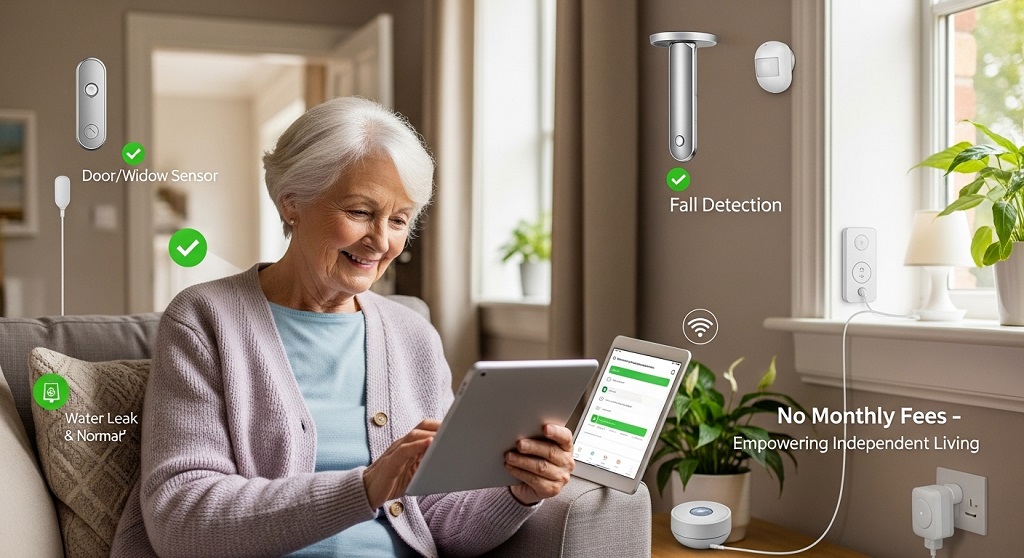
Caring for aging parents or relatives at home sounds simple—until something unexpected happens when no one is around. A missed step on the stairs. A bathroom fall. A door left open at night. These are small events that can quickly become serious risks. The good news is you do not need expensive monitoring subscriptions to protect elderly family members. Today, smart home sensors allow you to create a reliable safety system with one-time purchases and local alerts instead of monthly fees.
Smart home sensors for elderly safety without monthly fees are wireless devices that detect movement, door activity, water leaks, smoke, or falls and send alerts directly to your phone or smart hub. They work locally or through free apps, reducing long-term costs while increasing independence and peace of mind.
This guide explains how to set up a practical sensor system step by step. You will learn what sensors matter most, how to install them correctly, and how families are already using them successfully to support aging in place safely.
Why are smart home sensors important for elderly safety at home?
Smart home sensors reduce accident risks by detecting unusual activity patterns and sending alerts before small issues become emergencies.
Most senior-related injuries at home happen during routine activities. Walking to the bathroom at night. Entering the kitchen. Opening doors. These events appear normal but can signal danger when patterns change.
Smart sensors monitor:
- Unexpected inactivity
- Late-night wandering
- Door openings at unusual times
- Water leaks or stove hazards
- Falls or sudden movement stops
According to global aging-in-place research referenced by public health agencies, falls remain one of the leading causes of injury among adults over 65. Early detection significantly improves response time and recovery outcomes.
Subscription monitoring systems exist, but they often cost hundreds per year. A self-managed sensor setup provides similar protection using one-time hardware purchases.
What smart home sensors work best for elderly safety without subscriptions?
The most useful subscription-free elderly safety sensors include motion sensors, door sensors, water leak detectors, smoke alarms, and emergency buttons.
You do not need dozens of devices. A small, focused system delivers strong protection.
| Sensor Type | Purpose | Placement Area |
|---|---|---|
| Motion sensors | Detect inactivity or unusual movement | Hallways, bedroom |
| Door sensors | Track exits or nighttime wandering | Main entrance |
| Water leak sensors | Prevent slip hazards | Bathroom, kitchen |
| Smoke detectors | Fire warning alerts | Kitchen, living area |
| Emergency buttons | Manual help alerts | Bedside, bathroom |
Choose sensors that connect through free mobile apps or open smart home hubs instead of paid monitoring services.
How do smart home sensors work without monthly monitoring fees?
Smart sensors work without subscriptions by sending alerts directly through Wi-Fi hubs, local automation systems, or free smartphone apps.
Traditional medical alert services charge monthly because they route signals through call centers. Modern sensors remove that step.
Instead, alerts go to:
- Family smartphones
- Smart speakers
- Local automation hubs
- Home dashboards
This setup creates instant awareness without recurring costs.
Many households now prefer local notification systems because they allow faster response than third-party monitoring centers.
Which smart home hubs support elderly safety automation without subscriptions?
Smart hubs like open-source controllers and app-based ecosystems allow automation without requiring paid monitoring plans.
Popular hub options include:
- Local automation hubs with offline processing
- Voice assistant ecosystems with free routines
- Zigbee-compatible sensor controllers
- Wi-Fi sensor networks using mobile alerts
These platforms allow families to create custom safety triggers.
Example automation:
- If no motion detected for 3 hours → send alert
- If bathroom door closed too long → notify caregiver
- If front door opens after midnight → trigger phone notification
This approach supports independent living while maintaining supervision.
Where should smart sensors be installed for maximum elderly safety?
The safest smart sensor layout focuses on entrances, bathrooms, bedrooms, and kitchens because these locations present the highest accident risk.
Prioritize placement in this order:
Bedroom monitoring zone
Install:
- Motion sensor
- Emergency button
- Night movement detection light trigger
This helps track sleep movement patterns and detect inactivity.
Bathroom monitoring zone
Install:
- Water leak sensor
- Motion detector
- Emergency alert button
Bathrooms are one of the highest fall-risk locations.
Kitchen monitoring zone
Install:
- Smoke detector
- Temperature alert sensor
- Motion tracker
Cooking-related accidents increase with age.
Entrance monitoring zone
Install:
- Door sensors
- Motion sensors
- Outdoor entry alerts
This prevents unnoticed wandering events.
How much does a subscription-free elderly smart safety system cost?

A complete elderly safety sensor setup typically costs between $80 and $250 as a one-time investment.
Cost depends on device quantity and automation complexity.
Example starter setup:
- 2 motion sensors
- 1 door sensor
- 1 leak detector
- 1 smoke detector
- 1 emergency button
This configuration covers most high-risk areas.
Compared to subscription monitoring services that charge monthly fees, this setup often pays for itself within one year.
Can smart home sensors detect falls without professional monitoring services?
Smart motion sensors and inactivity tracking routines can indirectly detect falls by identifying unusual movement interruptions.
While they are not medical-grade fall detectors, they provide strong early warning signals.
Example automation logic:
- No hallway motion detected after usual wake-up time
- Bathroom motion stops unexpectedly
- Bedroom exit not detected during morning routine
These patterns help caregivers respond quickly.
Some families also combine wearable emergency buttons with motion tracking for additional protection.
How do families successfully use smart sensors for elderly safety at home?
Families use sensor routines to monitor activity patterns and respond faster during unusual situations without invading privacy.
A documented aging-in-place case pattern observed in caregiver technology adoption studies shows households reduce response times significantly after installing motion-based alert systems.
Example real-life setup:
- Motion sensor placed in hallway
- Door sensor installed at entrance
- Bathroom leak detector connected to phone alert
- Night activity notifications enabled
Result:
- Caregivers received alerts when routines changed
- Night wandering incidents were identified early
- Bathroom hazards were prevented quickly
This approach supports independence while improving safety awareness.
How do you set up smart home sensors step by step without technical experience?
Setting up elderly safety sensors involves choosing devices, connecting them to a hub or app, placing them correctly, and creating alert routines.
Step 1: Choose compatible sensors
Select devices that work with the same mobile app or automation hub.
Step 2: Install the hub or controller
Follow the manufacturer setup instructions using Wi-Fi connection.
Step 3: Place sensors strategically
Focus on bedrooms, bathrooms, kitchens, and entrances.
Step 4: Configure alerts
Create automation triggers for inactivity or unusual movement.
Step 5: Test emergency scenarios
Simulate alerts to confirm notification delivery.
This process usually takes less than one hour.
What privacy advantages do non-subscription smart sensors provide?
Local smart sensor systems protect privacy because data stays within the home network instead of external monitoring centers.
This matters for elderly users who value independence.
Privacy benefits include:
- No third-party monitoring calls
- No cloud storage requirements
- No external data sharing
- No camera surveillance needed
Motion-based monitoring respects personal space while maintaining safety coverage.
What mistakes should you avoid when installing elderly safety sensors?
The most common mistake is installing too many sensors instead of placing the right sensors in high-risk areas.
Avoid these errors:
- Ignoring bathroom monitoring
- Skipping entrance sensors
- Overcomplicating automation rules
- Using incompatible devices
- Forgetting battery replacement schedules
A simple system often performs better than a complex one.
Conclusion: How can you build an affordable elderly safety system today?
Protecting elderly family members does not require expensive monitoring contracts or complicated installations. A small group of smart home sensors placed in the right locations can dramatically improve response speed during emergencies and reduce accident risks inside the home.
Start with motion sensors, door alerts, and leak detectors. Add automation routines that notify caregivers when activity patterns change. This approach supports independence while maintaining oversight where it matters most.
If you want a practical next step, begin by mapping the highest-risk areas in your home today and install one sensor in each location. Even a simple setup can make a measurable difference in safety and peace of mind.
Frequently Asked Questions About Smart Home Sensors for Elderly Safety Without Monthly Fees
Do smart home sensors work without internet subscriptions?
Yes. Many smart sensors send alerts directly through free apps or local hubs without requiring paid monitoring plans.
Are smart sensors reliable for elderly fall detection?
Motion sensors cannot replace medical fall detectors but can identify inactivity patterns that suggest possible emergencies.
Can elderly people live independently using smart safety sensors?
Yes. Sensor-based monitoring supports aging in place by providing silent supervision without reducing independence.
What is the best starter sensor for elderly safety?
A hallway motion sensor is often the most effective first device because it tracks daily movement routines.
Do smart safety sensors require professional installation?
No. Most wireless sensors install in minutes using adhesive mounts and mobile apps.
Are smart sensors better than medical alert subscriptions?
They provide different benefits. Sensors support continuous monitoring, while medical alerts allow manual emergency contact.
How many sensors are needed for basic elderly home protection?
Most homes require only four to six sensors to cover major safety risks effectively.
Related Topics: How to Choose the Best AI Wearable Gadget for Daily Life (2026 Guide)
What Next: Guitar Headphone Amp Headphone Damping Factor Impact